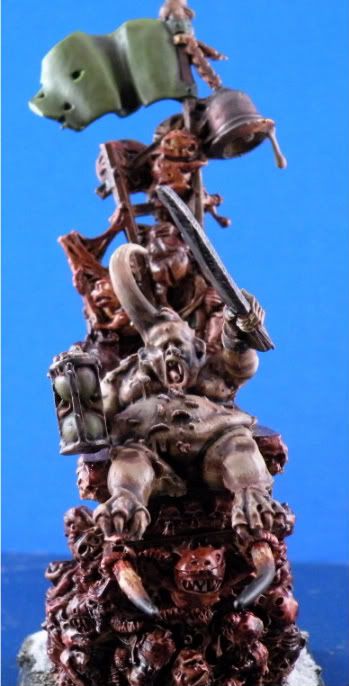
Trouble with my Nikon P80

redarmy27

New member
Hey guys,

I\'m having a terrible time trying to find my \"zone\" for taking pictures of my minis. I\'m using a Nikon P80, using the \"P\" setting and I\'m using the Macro function. I also have the \"lighting\" function set to \"flourescent\" as well. I\'m using a lightbox to get the lighting just right.

Here\'s what I have so far, my most recent picture:
Here\'s my Nurgle Herald:

Picture008.jpg

Picture007.jpg

Picture006.jpg


I just can\'t seem to get the pictures nice, crisp and clear. Any feedback on the photos would be good, especially if anyone is using the same camera.

Thanks!!

Jake
 

War Griffon

New member
Several questions and a few things to try, bare in mind I am not familiar with the P80 as I use the D80 or a Fuji camera normally.

However, take the camera out of program mode to start with, you say you are using it in macro mode, therefore take it out of program P and set it to A so that you have arpeture priority, this allows you to control your depth of field and with an f stop of around f11 you should get crisper photos.

Secoundly you say that you have the white light balance set for \"flourescent\" and you are using a light tent/light box, what sort of lights are you using?
It may be worth you putting a sheet of your background paper into the light box and setting a custom light balance, (your manual should tell you how to do this) alternatively try the other light settings until you are happy with the results also if you can then try bracketing as well. By doing this you can take several shots i.e. one shot normal, one shot under exposed and one shot over exposed and then when editing choose the one that looks best.

When I use my light tent and lights I have the camera set for daylight/sunny and then do a level adjust in photoshop or gimp to finish it off.

I have also found that some figures just don\'t look right on certain backgrounds. Looking at the shots you have posted above the background looks very bright compared to the figure you are trying to photograph so it might also be worth you changing the postion of the lights around the light tent as well, all this is a case of trial and error until you get what suits you and then remember the settings and positions for next time :D
 

redarmy27

New member
Thanks for the feedback. I just took some more shots right now and I did what you suggested and my pictures seemed to have come out better, much better. The bulbs I\'m using are iridescent, so I set my camera to that mode. The colors look more \"real\" now.

I\'ll post them here shortly. By the way, what color backgrounds do you use for your pictures or you would suggest for a guy like this?

Jake
 

redarmy27

New member
Well here we are, I downloaded gimp and sized it nicely. I think it looks much better than the original one!

Herald1.jpg


Thanks for the help!

Jake
 

War Griffon

New member
Yes you can see a definate increase in detail and it looks a lot better :D

What are you using at the moment for a background as it still seems to be very bright?

I usually use coloured paper/card from an art shop, a lot of people make up a fade blue to white/white to blue in photoshop or GIMP and print it out and use that for a background but you would need to have a very good quality colour printer to get a decent result.

I tend to range between 3 colours for backgrounds depending on the colours of the mini itself, I have a plain mid blue, a buff colour and a nuetral gray. You also try changing th ebackground of you mini in GIMP itself as this may well help to bring it out more and not make the background so bright.
 
Back To Top
Top